One system for the whole clinic.
Reception, nurses, doctors, laboratory, ECG, ultrasound, radiology, pharmacy and the till — each with its own screen, all sharing one record. And an app in every patient's pocket.
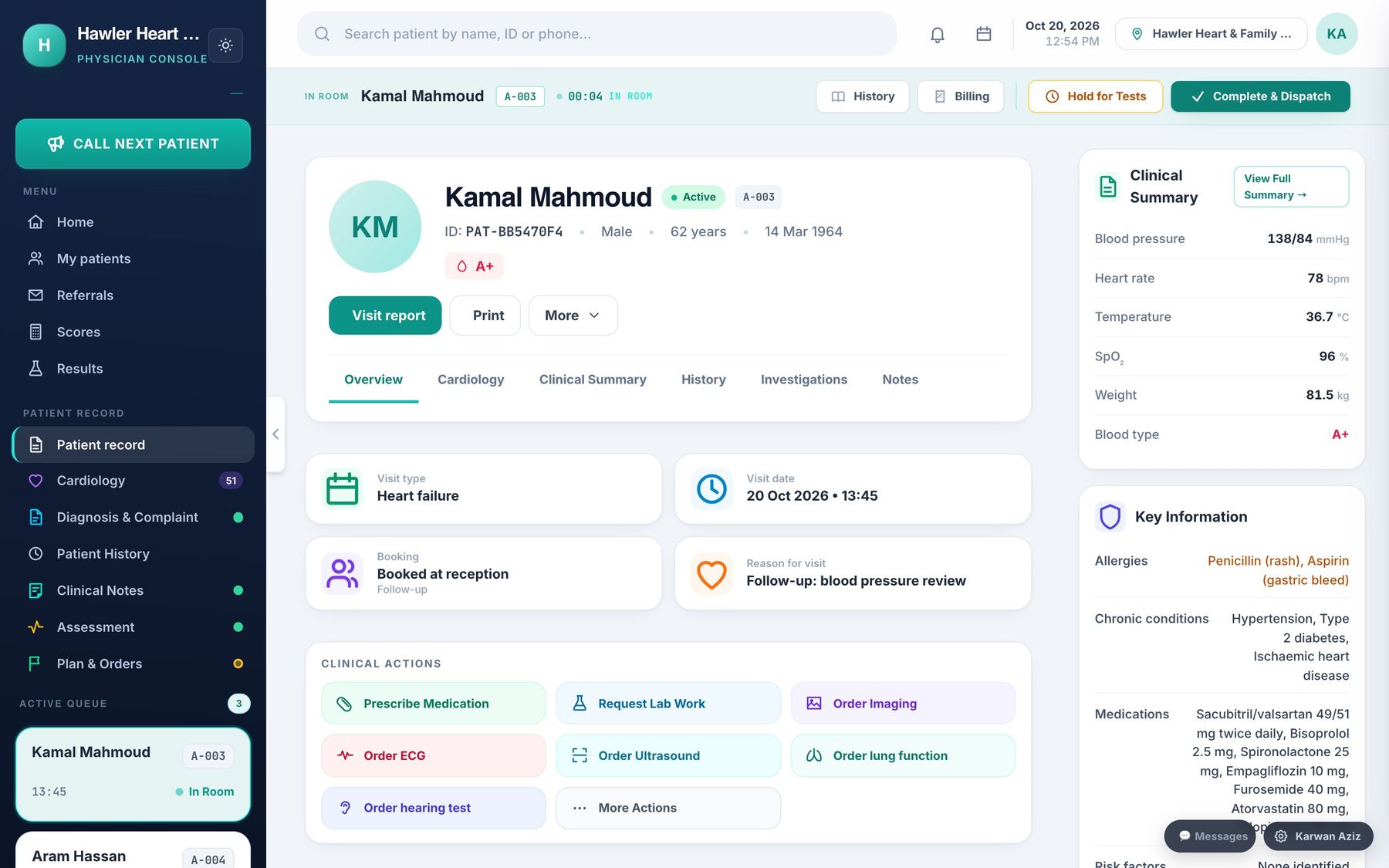
A chart for every kind of doctor.
22 specialties, each adding its own chart to the notes every doctor writes — with the anatomy drawn, not described. These are the real screens.
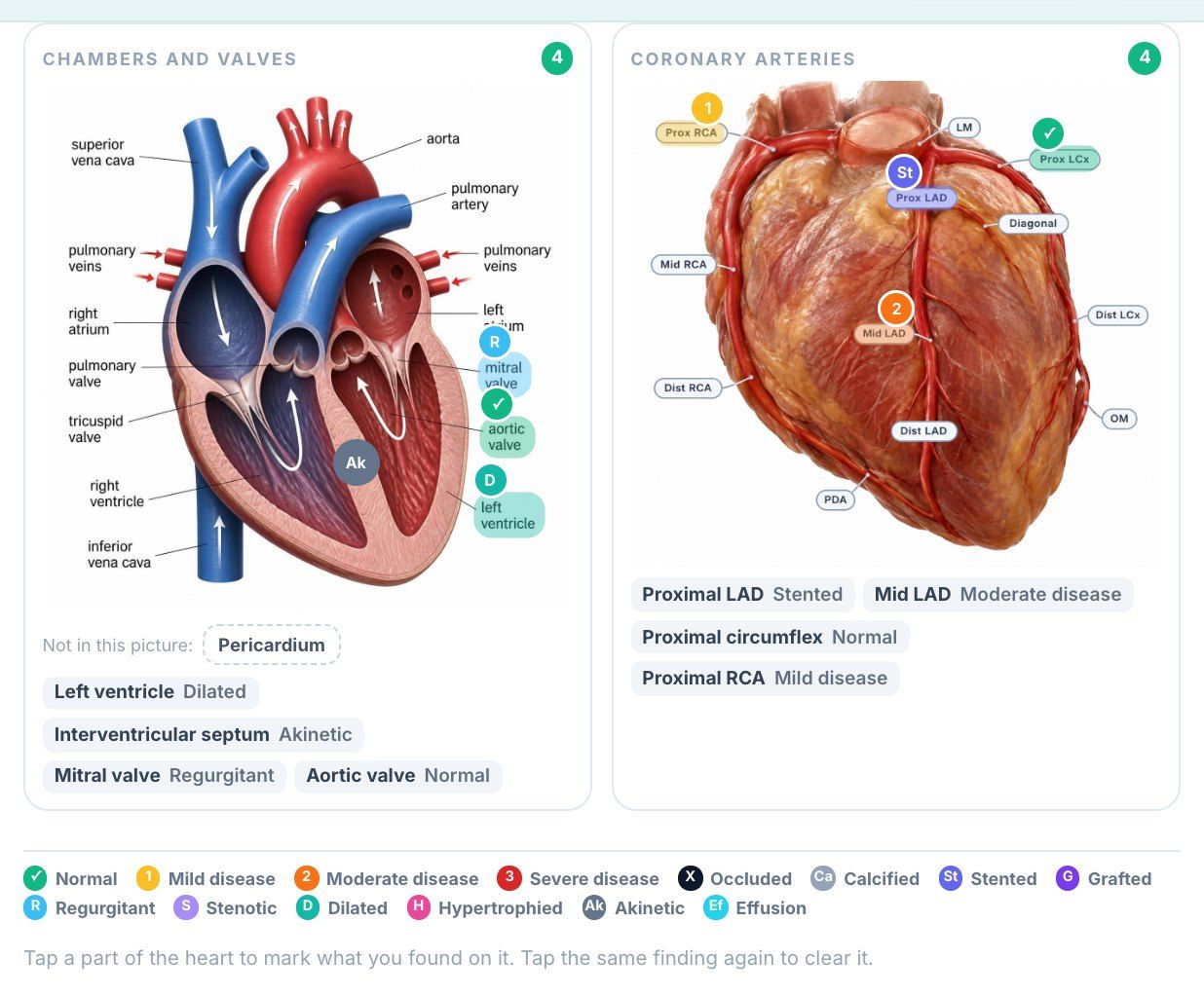
The heart, marked on the anatomy — not described in a paragraph.
Heart failure, chest pain, rhythm and devices, with an anatomical heart and coronary tree to mark findings on.
- ✓Five kinds of visit. Chest pain, heart failure, rhythm, after a procedure, and prevention — each opens its own sections.
- ✓A heart you can mark. Chambers, valves, great vessels and every coronary segment. Each structure offers only the findings that can apply to it: a valve leaks or narrows, an artery is stented or occluded.
- ✓Echo and ECG in the chart. Ejection fraction and method, wall motion, valves, PR, QRS, QTc and findings — recorded as data, not as free text.
- ✓Heart failure, followed over time. NYHA class, fluid status, dry weight, NT-proBNP and the disease-modifying medicines, with a titration plan.
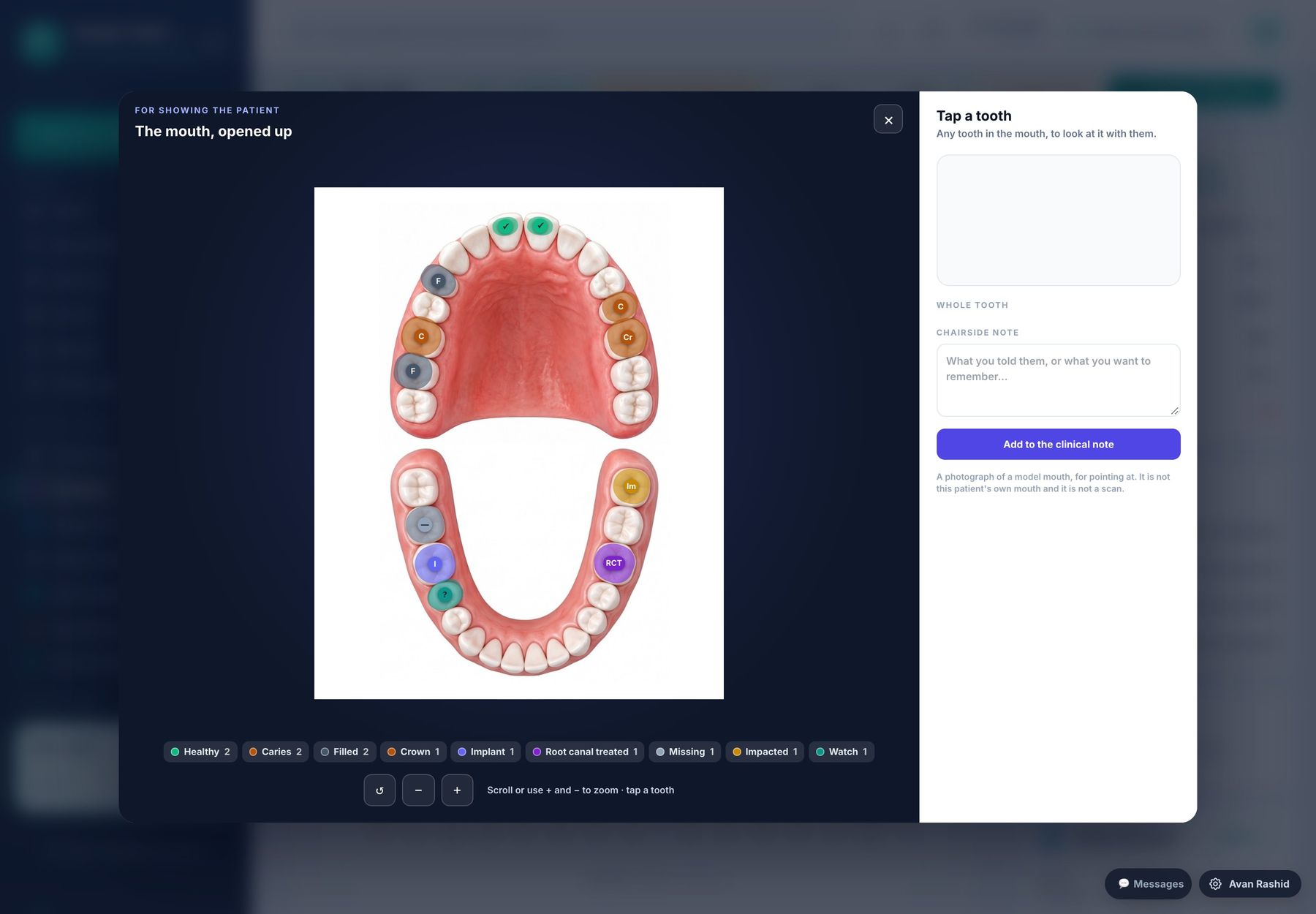
A tooth chart a dentist actually wants to use — and a 3D mouth to show the patient.
FDI tooth chart with surfaces, a 3D view of the mouth, periodontal charting, orthodontics and the treatment plan.
- ✓Tooth and surface charting. Twelve conditions per tooth, surfaces for fillings, and milk teeth for children.
- ✓Safety before treatment. Anticoagulants, bisphosphonates, prophylaxis and problems with local anaesthetic, asked before you start.
- ✓Periodontal and oral. Hygiene, bleeding on probing, calculus, pocket depth, mobility and recession.
- ✓Orthodontics. Appliance, arch, phase, overjet, overbite, crowding, wire and elastics.
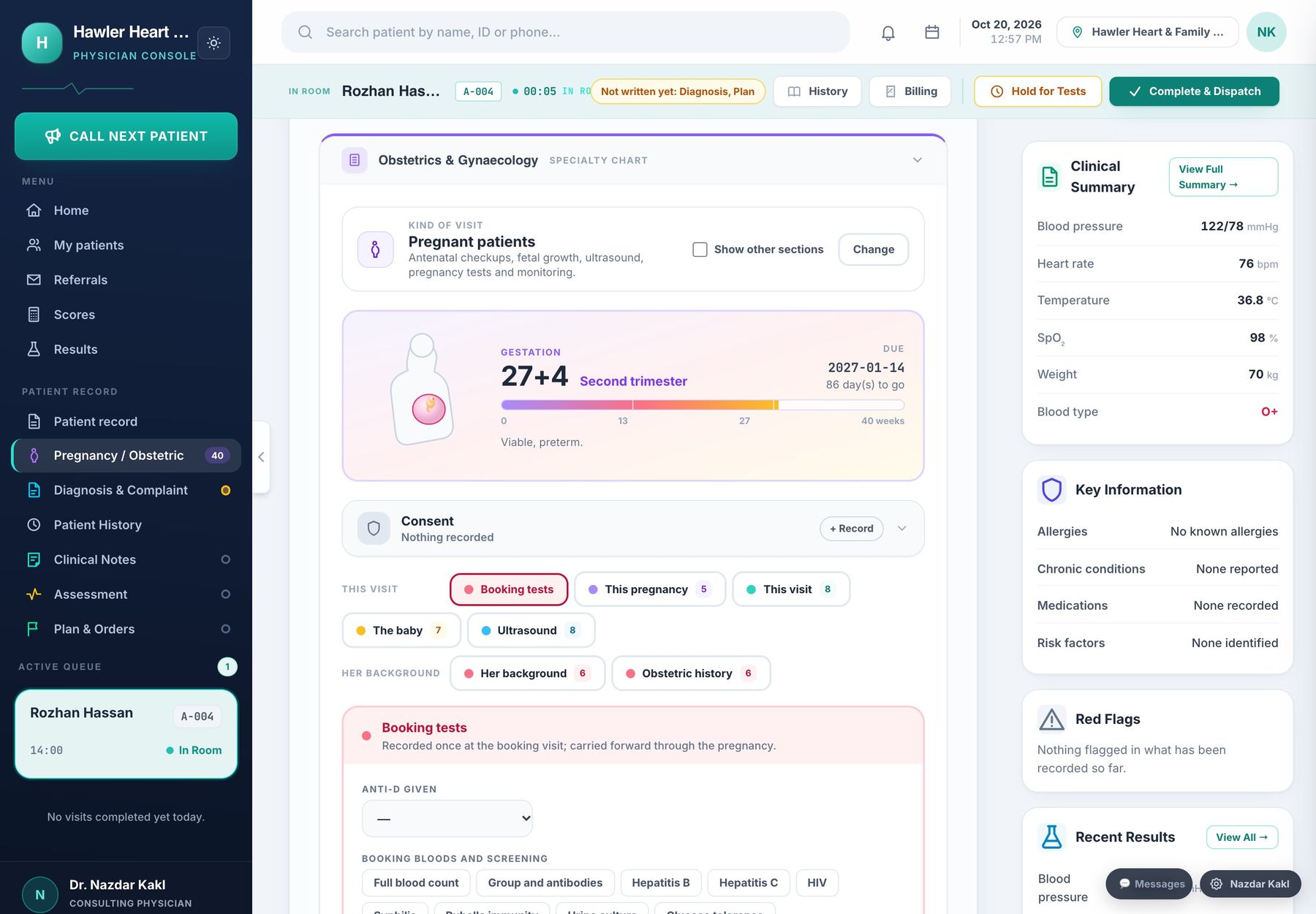
A pregnancy followed week by week, from booking to the postnatal check.
Antenatal care, scans and growth, labour and the postnatal visit — plus gynaecology, fertility, family planning and menopause.
- ✓Nine kinds of visit. Antenatal, postnatal, gynaecology, fertility, family planning, menopause, adolescent, pregnancy loss and other.
- ✓The pregnancy as one record. Booking, obstetric history, every antenatal visit, scans, labour and the newborn — linked across visits.
- ✓Scans and growth. Biometry and estimated fetal weight across scans, so growth is seen as a line rather than a single number.
- ✓Antenatal alerts. Raised blood pressure with protein, reduced movements and other warning signs are raised while the doctor is still in the room.
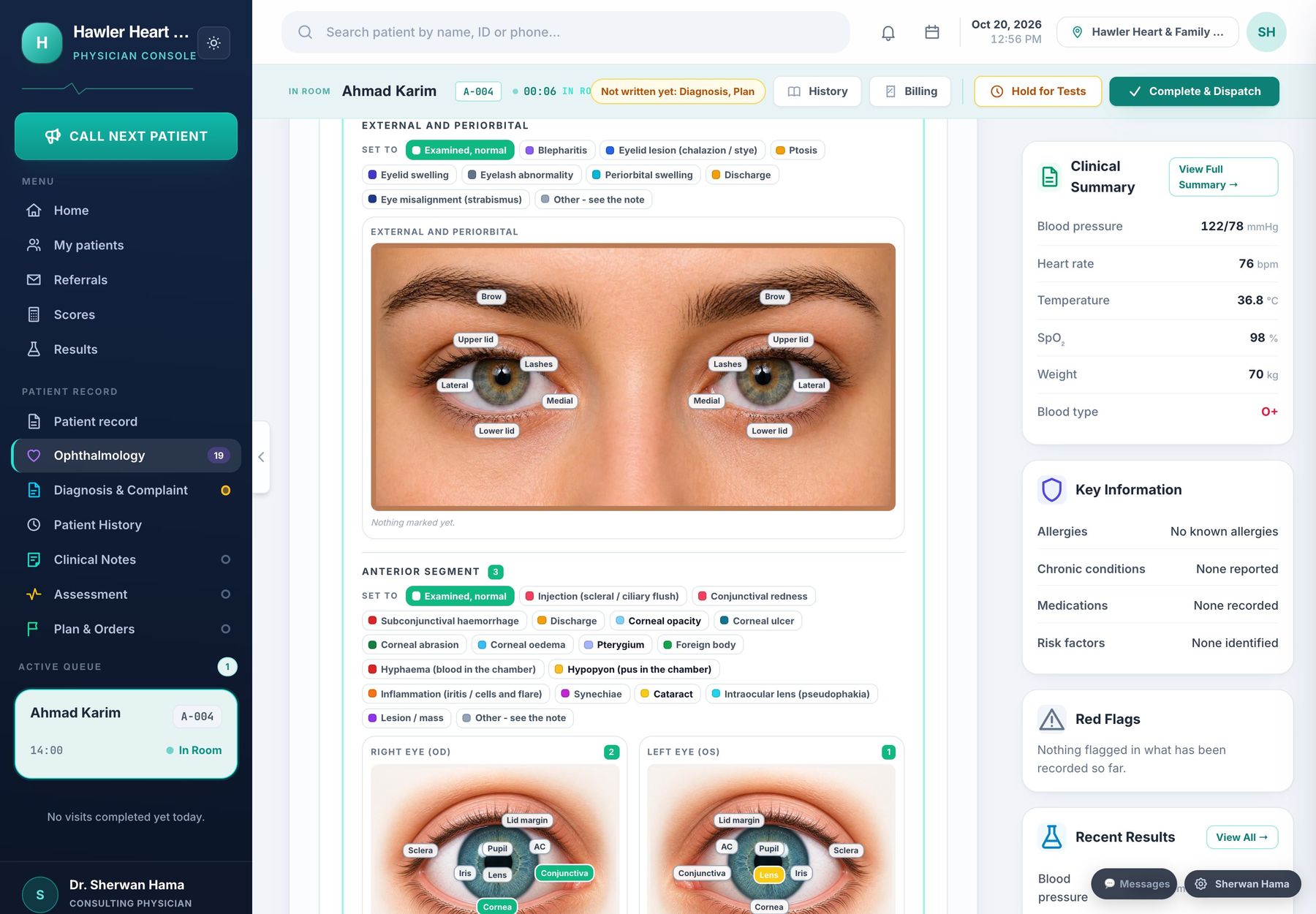
Acuity, pressure and the retina — findings placed on the eye itself.
Visual acuity, refraction, pressure, pupils, the anterior segment and the fundus, with diabetic and glaucoma pathways.
- ✓Acuity and refraction. Unaided, corrected and pinhole for each eye; sphere, cylinder, axis and spherical equivalent.
- ✓Pressure and pupils. Intraocular pressure and method, pachymetry, pupil reactions, RAPD, motility and squint.
- ✓Anterior segment and fundus. Cataract, ulcer, iritis, haemorrhage, exudates, new vessels, disc cupping — marked on the structure.
- ✓Diabetic retinopathy. Grading for each eye, maculopathy, laser and injections, and when screening is next due.
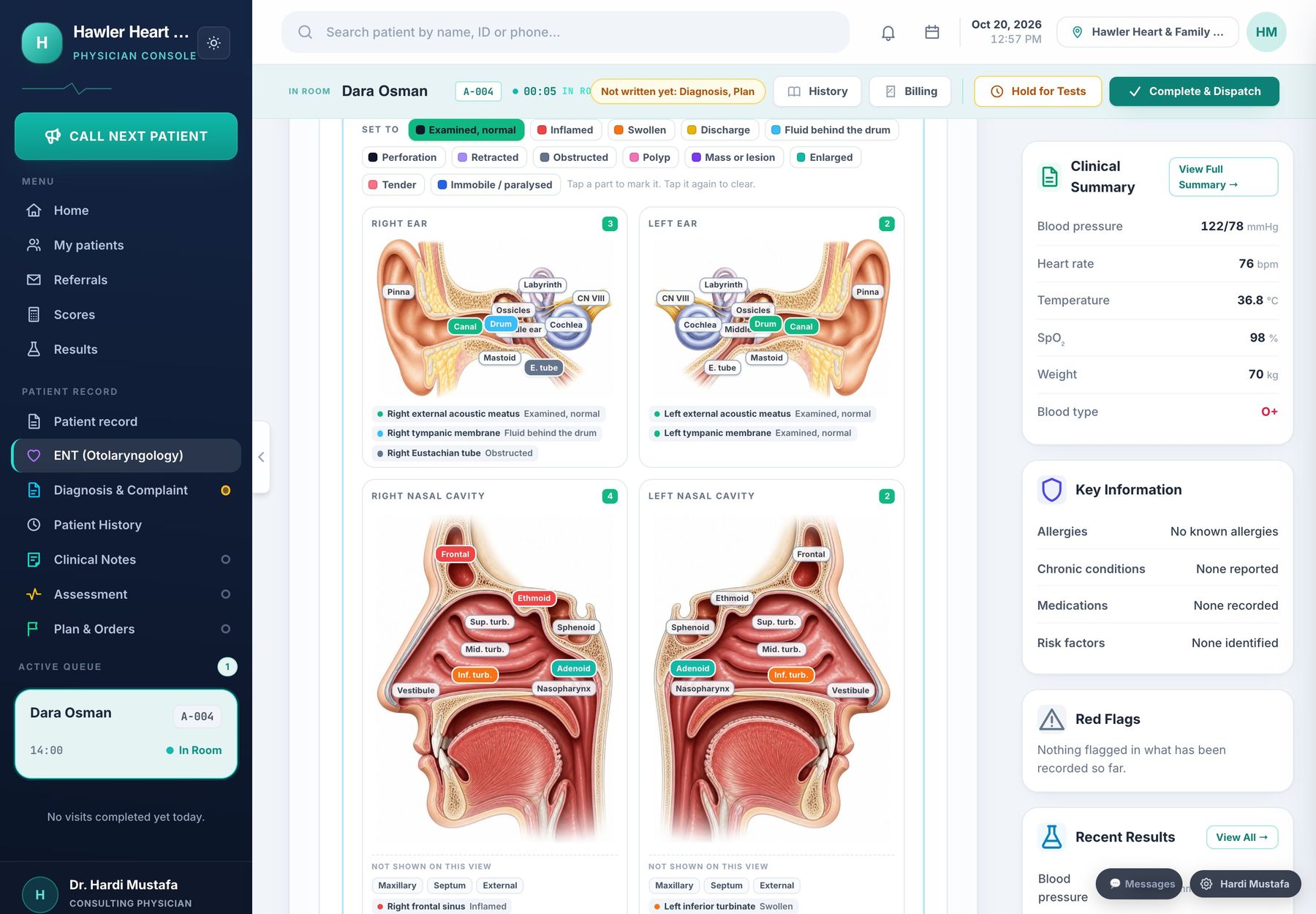
Ear, nose and throat, marked where you looked.
Anatomical drawings of both ears, the nasal cavities and the throat, with audiometry in the same record.
- ✓A drawing for each side. Right and left ear, right and left nasal cavity, and the throat — the patient’s right is always on the left of the picture.
- ✓Thirteen findings. Inflamed, swollen, discharge, fluid behind the drum, perforation, retracted, polyp, mass and more.
- ✓Audiometry. Hearing tests ordered from the doctor’s screen and recorded as an audiogram.
- ✓Red flags. A section of its own for the signs that should not wait.
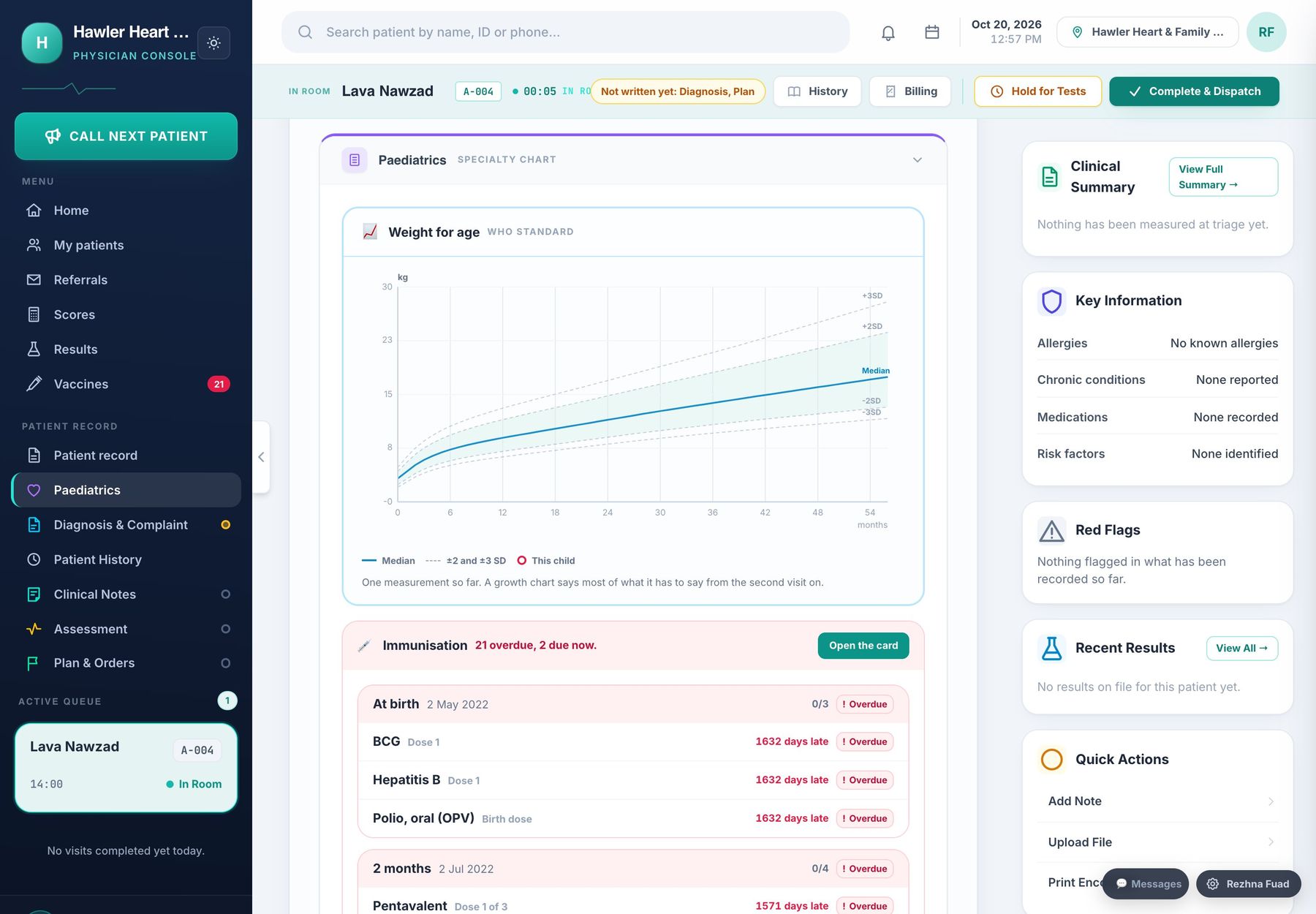
Growth on the curve, and every vaccine accounted for.
Growth charts, development, feeding and a full immunisation register with what each child is owed.
- ✓Growth charts. Weight, height and head circumference plotted against age, so a child falling off their line is seen.
- ✓Development and feeding. Milestones and feeding recorded at each visit.
- ✓Immunisation register. The schedule for every child, doses given with the batch, and the ones that are overdue.
- ✓For parents. The child’s immunisation card in the patient app, worded for a parent.
Most clinics run on several things that do not talk to each other.
A paper book at the desk, a laboratory register, prescriptions written by hand, a cash drawer counted at night, and a telephone that rings all day asking when the results are ready. Every one of them works. None of them knows about the others.
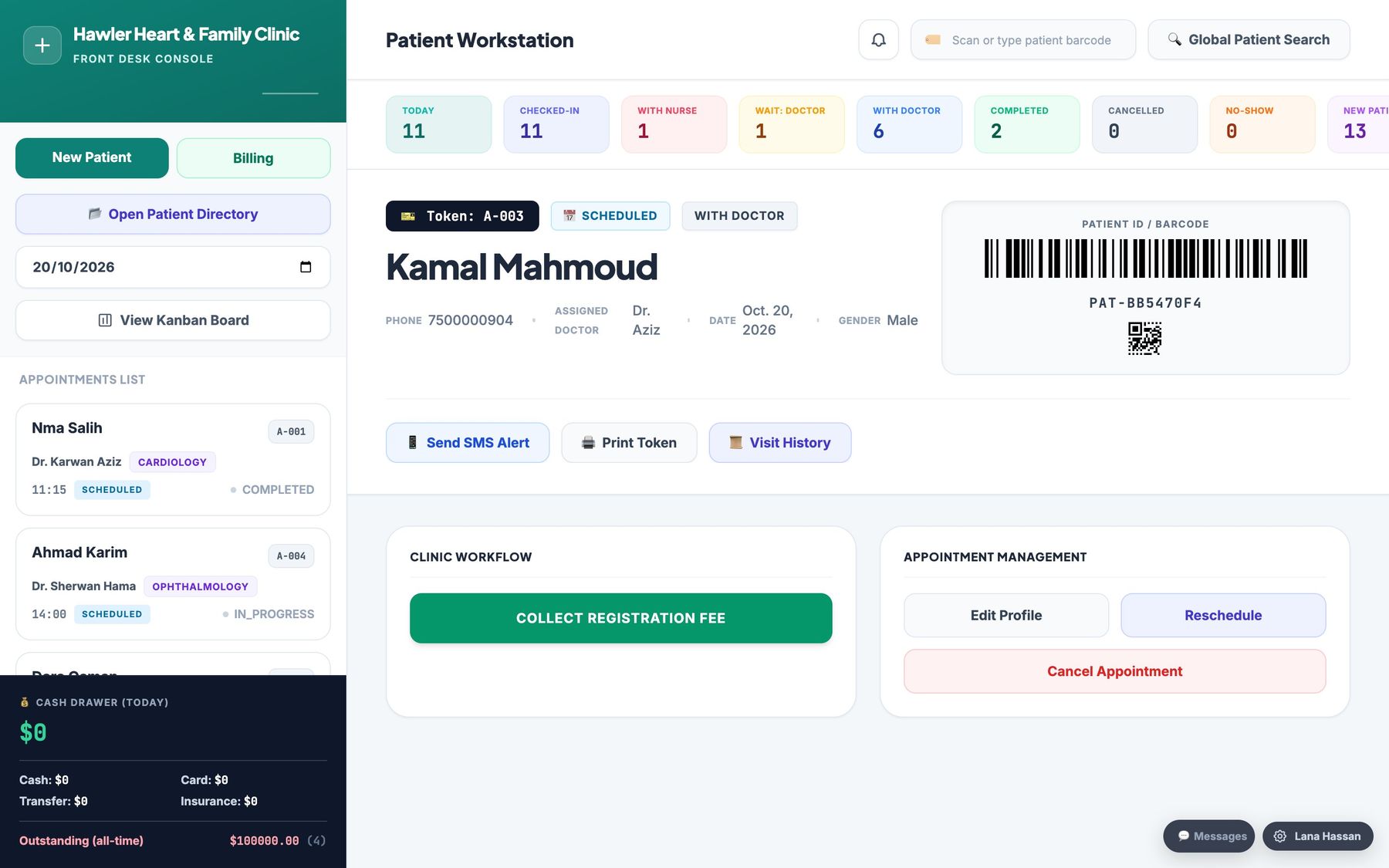
Reception and the queue
Register somebody once, book them, and the waiting room screen calls them. The desk sees the whole day on one page.
Read moreThe nursing station
Vital signs and the reason for the visit, taken before the doctor — and already open when the doctor starts.
Read moreThe doctor's room
History, allergies, previous results and last visit already open. Prescribe, order a test, write the report, and it is filed.
Read moreLaboratory
Orders arrive from the doctor, results go back to the doctor, and anything critical is flagged rather than left in a pile.
Read moreRadiology, ultrasound and ECG
Ordered with the clinical question attached, reported properly, and printed into the visit report with the doctor's own note.
Read morePharmacy and the till
Stock, batches, expiry dates and prices. A prescription-only medicine cannot be sold on a cashier's own authority.
Read moreMoney
Invoices, part payments, refunds, the drawer handed over at the end of a shift, and where the month actually went.
Read moreThe patient's own app
Results on their phone and appointments booked in a few taps — so the telephone stops ringing.
Read moreOne body. One record. Every room.
Turn the model, zoom in, and tap a glowing point to see which screen looks after that part of the patient.
Tap a glowing point
Every point on the body is looked after by a different room — and every room writes into the same record.
Everyone sees exactly what their job needs.
Pick a room to see its screen. Each one shows only the work that belongs there, and all of them write into the same patient record.
The front desk, calm.
Register somebody once, book them, check them in, and call them to the waiting-room screen. The whole day on one page.
- ✓Who is waiting, who is in, who is late
- ✓Bookings from the desk, the website and the app in one list
Vital signs before the doctor asks.
The nurse records the readings and the reason for the visit. By the time the patient sits down, the doctor already has them.
- ✓Blood pressure, pulse, temperature, oxygen and weight
- ✓Sent straight into the doctor's view of the visit
The whole patient, already open.
History, allergies, previous results and last visit on one screen. Prescribe, order a test or a scan, write the report — it is filed.
- ✓Allergy and interaction warnings while prescribing
- ✓Order lab, ECG, ultrasound and X-ray from the same page
Orders in, results out, nothing lost.
Orders arrive from the doctor, results go back to the doctor and to the patient's app, and anything critical is flagged to a person.
- ✓Critical values raised, not buried
- ✓Released results appear in the patient app
The tracing and the report, together.
Record the ECG, write the finding, and it lands in the visit next to the doctor's note.
- ✓Ordered with the clinical question attached
- ✓Printed into the visit report
Scanned, reported, sent back.
The request comes with the doctor's question. The report is written in the room and goes straight back into the visit.
- ✓A worklist of today's scans
- ✓Report printed with the doctor's own note
A worklist with the reason on every request.
No more guessing why a film was ordered. Every request carries the clinical question, and every report goes back to the doctor who asked.
- ✓Urgent requests float to the top
- ✓Reports filed into the patient's history
The prescription is already there.
Stock, batches, expiry dates and prices. A prescription-only medicine cannot be sold on a cashier's own authority.
- ✓Expiring batches shown before they expire
- ✓Low stock flagged
One invoice for the whole visit.
Consultation, tests, scans and medicines on one bill. Part payments, refunds, and the drawer handed over at the end of a shift.
- ✓Every payment written into the audit trail
- ✓See where the month actually went
Follow a patient through the clinic.
Nobody retypes a name. Each room picks up where the last one left off.
- 🗓
Reception
Registered once and booked in.
- 💉
Nurse
Vital signs taken.
- 🩺
Doctor
Full history on opening.
- 🧪
Tests and scans
Lab, ECG, ultrasound, X-ray.
- 💊
Pharmacy
Prescription already there.
- 🧾
Cashier
One invoice for the visit.
- 📱
At home
Results arrive in the app.
Their results and their bookings, in their pocket.
Patients get an app of their own. They see results as soon as the clinic releases them and book their next visit without calling the desk.
Results on the phone
Lab and imaging results, the moment they are released.
Book in a few taps
Choose the department, the doctor, the day and the time.
A note when it is ready
A notification instead of a phone call to the desk.
Their own history
Past visits, prescriptions and upcoming appointments.
Complete blood count
Fasting glucose
Upcoming
Last visit
The two screens your clinic actually lives in.
Everything a receptionist needs is on one page, and everything a doctor needs is on the next one. Nobody is asked to remember where anything is.
- ✓The whole day, with who is waiting and who is late
- ✓One patient, one file — however many times they come
- ✓Allergy and interaction warnings while prescribing
- ✓Every change written into an audit trail
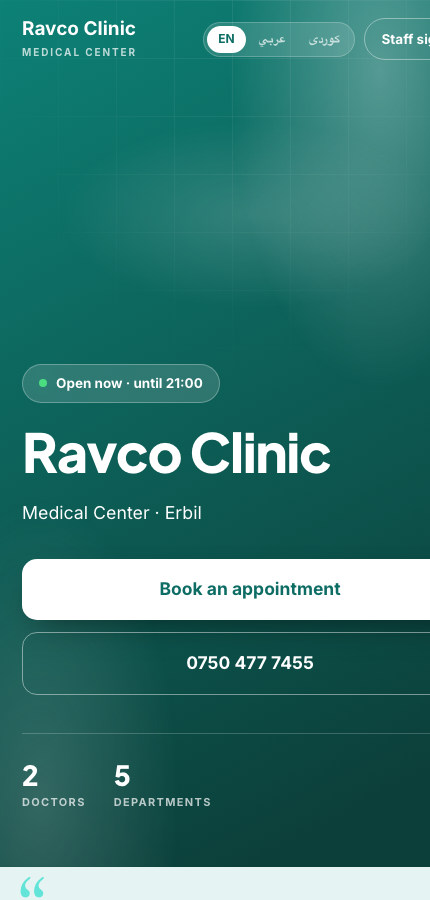
Every clinic gets its own website.
The day a clinic is created it has an address of its own, painted in its own colour, listing its own doctors and opening hours — and a Book button anybody can use without an account.
- ✓Its name, logo and colour, from the settings it already filled in
- ✓Departments, doctors, opening hours and a map
- ✓Online booking, switched on or off by the clinic itself
- ✓English, Arabic and Kurdish, on the same page
From first call to first patient.
Talk to us
Half an hour on your screen, with your own doctors and departments.
Fill in your clinic
Name, logo, colour, departments, doctors, rooms and opening hours.
Open the doors
Your website is live the same day, your staff sign in, and patients can start booking.
The parts that are never sold separately.
Some things are not features. They are the reason a clinic can be trusted with somebody's health, and they are in every plan.
Allergies and critical results
An allergy warns the person prescribing. A dangerous result is flagged to a human being rather than filed.
The whole history
Every visit, every medicine, every result — for as long as the patient keeps coming.
One clinic cannot see another
Several clinics run on one system and no request crosses between them. It is refused, not filtered.
Backups and an audit trail
Who changed what, and when — and a copy of everything, taken on a schedule.
Each role sees its own work
The cashier does not read clinical notes, and the pharmacy does not edit a diagnosis.
Patients see only what is released
A result reaches the app when the clinic releases it, not before.
Read about the part you care about.
Each part of the system has its own page, with the real screen and what it does in detail.
Specialties
A chart built for each kind of doctor, on top of the notes every doctor writes.
Departments
A screen for every room in the clinic, all writing into one patient record.
Running the clinic
Management, reports, safety and the clinic’s own website.
What clinic owners ask first.
Do I pay for each computer?
Which departments are covered?
What can patients do in the app?
Which languages does it speak?
Can other clinics see our patients?
Do patients need an account to book on the website?
What happens to our data if something breaks?
See it on your own clinic's day.
Half an hour, on your screen, with your own list of doctors and departments.